Back
Tom's Hardware6 h ago

Nvidia Sunsets Classic GPU Control Panel, Embraces New Nvidia App

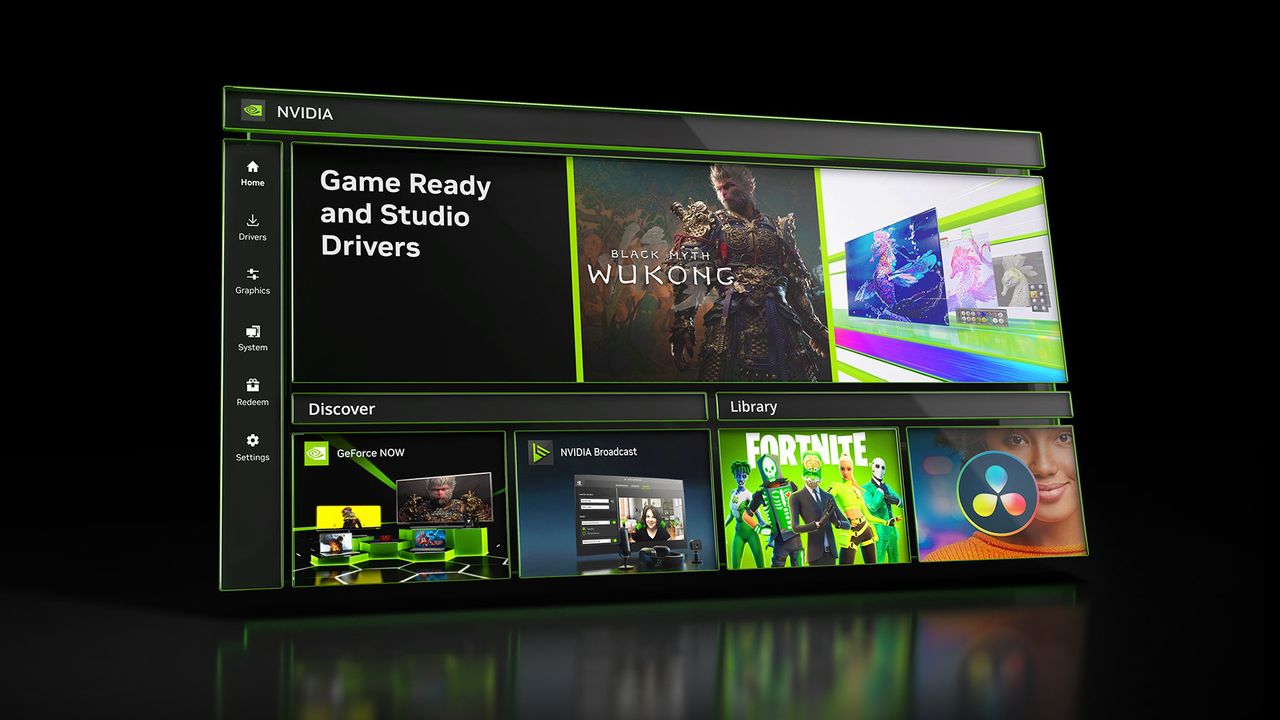
Nvidia is phasing out its long-standing GPU Control Panel after two decades, with new GeForce driver updates exclusively integrating functionality into the modern Nvidia App. This marks a significant transition for users, consolidating various settings and features into a unified platform.

Nvidia Sunsets Classic GPU Control Panel, Embraces New Nvidia App

After two decades of dedicated service, Nvidia is finally retiring its iconic GPU Control Panel, a staple for PC gamers and professionals optimizing their graphics cards. This significant shift means that future GeForce driver updates will no longer include the legacy control panel; instead, all functionalities and new features will be exclusively integrated into the more contemporary Nvidia App.

Affiliate content
Instant Gaming

Games up to -90% off

Instant key delivery on Instant Gaming

Browse deals →

The Nvidia Control Panel, first introduced with the GeForce 256 GPU in 1999, has been a familiar interface for millions, allowing users to fine-tune everything from display resolutions and refresh rates to 3D settings and multi-monitor configurations. Its longevity is a testament to its reliability and comprehensive suite of options. However, as software evolution marches on, the need for a more streamlined, modern application became apparent.

The Nvidia App, which has been in a beta phase, represents Nvidia's vision for a unified platform. It combines various elements previously scattered across different applications, such as GeForce Experience for game optimization and driver updates, and the Control Panel itself for hardware settings. This consolidation aims to provide a more intuitive and cohesive user experience, making it easier for users to manage their GPU, optimize games, and access new features from a single interface. While some long-time users may feel a sense of nostalgia for the classic control panel, the move to the Nvidia App is expected to bring improved performance, better integration with cloud services, and a more user-friendly design, setting the stage for future advancements in GPU management.

Summary based on third-party reporting.

Original source: Tom's Hardware

Recommended

Crafting Your Own IEM Cologne 2026 Souvenir Skin with the CS2 Souvenir-O-Matic
Dot Esports1 h ago

Crafting Your Own IEM Cologne 2026 Souvenir Skin with the CS2 Souvenir-O-Matic

Learn how to transform any existing CS2 skin into a prestigious gold-stickered tournament Souvenir skin using the simple steps outlined below. This guide provides a comprehensive walkthrough of the Souvenir-O-Matic process for IEM Cologne 2026.

Read article
IEM Cologne 2026 Major Shop: Unveiling Stickers and Dynamic Pricing
Dot Esports1 h ago

IEM Cologne 2026 Major Shop: Unveiling Stickers and Dynamic Pricing

The IEM Cologne 2026 Major Shop is now open, offering a wide array of exclusive stickers to commemorate the tournament. This guide explains how the shop operates and delves into its dynamic pricing system.

Read article
The Top CS2 Anime Stickers of 2026 for Customization Enthusiasts
Dot Esports1 h ago

The Top CS2 Anime Stickers of 2026 for Customization Enthusiasts

For those looking to infuse their CS2 arsenal with vibrant anime aesthetics, 2026 offers a fantastic collection of themed stickers. Explore the diverse range of anime stickers available to personalize your favorite weapon skins.

Read article
NotebookLM Streamlines Source Management with Automatic Updates
Android Authority1 h ago

NotebookLM Streamlines Source Management with Automatic Updates

Google's AI-powered research assistant, NotebookLM, now offers enhanced functionality to automatically update source documents, eliminating the need for manual re-syncing. This improvement ensures that your research materials are always current, simplifying the workflow for users.

Read article